Provisioning Manager
Provisioning Manager is the Windows application used to inspect and customise the rules executed by the Atria Provisioning Engine. This section documents the customer-supported extension points and the request properties available to conditions and actions.
Export or otherwise record the existing rule before changing it, and test the change with a non-production customer. A rule can create, update, or remove resources in Active Directory and connected services.
Start here
Use these references when building a rule:
- Rule values and PowerShell actions: property syntax, arrays, hashtables, conditions, and PowerShell actions.
- Customer and user provisioning: properties available during core customer and user provision/deprovision events.
- Custom service provisioning: the base customer-service and user-service contract, including service and package properties.
- Microsoft Online rule reference: additional MSOL values for customer and user service events.
- Workspace Item provisioning rule reference: Workspace Item events and properties for customer and user provisioning, with guidance on when to use Workspace Automation.
- Run Microsoft Online scripts: execute customer- or user-scoped scripts in a managed Microsoft 365 context.
Open Provisioning Manager
Provisioning Manager is installed on an Atria Provisioning Server. It is normally pinned to the Windows Start menu.
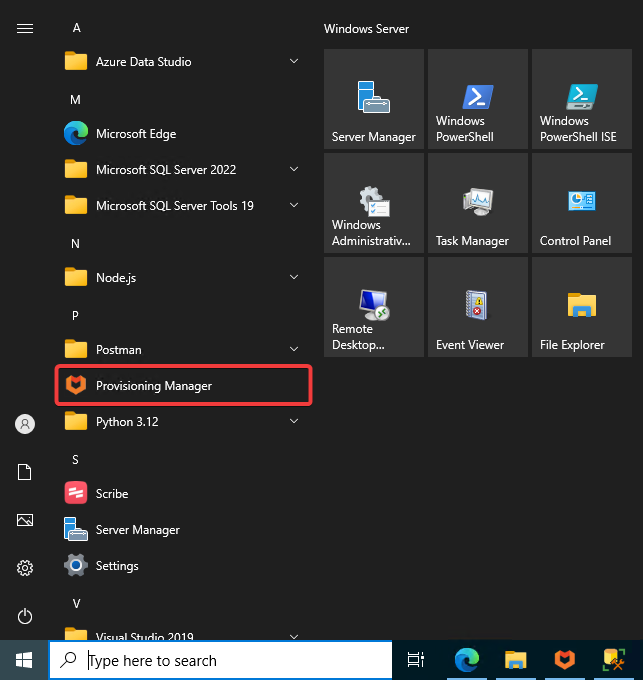
If it is not pinned, open:
C:\Program Files\Automate101\Atria\Provisioning Manager\ProvisioningManager.exe
How requests and rules relate
The platform creates a request containing a case-insensitive property collection. The Provisioning Engine routes that request through request-level processing and then through the matching lifecycle event rules.
For a lifecycle such as provision or deprovision, event rules are divided into three phases. Each phase has customer-editable Before and After rule sets around the Atria-managed Main rule set.
The equivalent PreDeprovision, Deprovision, and PostDeprovision phases are used when removing an object or service.
Choose the correct rule set
| What is changing? | Rule-set family | Example |
|---|---|---|
| Core customer object | Event$Customer$... | Event$Customer$After Provision |
| Core user object | Event$User$... | Event$User$After Provision |
| Service assigned to a customer | Event$Customer Service$<ServiceName>$... | Event$Customer Service$MSOL$After Provision |
| Service assigned to a user | Event$User Service$<ServiceName>$... | Event$User Service$WorkSpace$After Provision |
Use Before when your result must be available to the standard rule. Use After for work that depends on standard provisioning having completed. Avoid editing Main: Atria upgrades can restore the standard rules and remove those changes.
Provision events can run for both initial creation and later updates. Custom actions should therefore be idempotent: check current state before creating or changing an external object.
Rule anatomy
A rule contains:
- a sequence number, enabled state, and stop-on-error behaviour;
- an optional condition;
- the action and its parameters;
- an optional success action;
- an optional error action.
Values written by an action are added to the current request property collection and are available to subsequent rules in that request path. See Rule values and PowerShell actions before using request data in a condition or script.
Saving changes is done via 'File > Save' in the top left of the Provisioning Manager. Once you have saved your changes, you need to restart the 'Atria Provisioning Service' on the Provisioning server(s). This also applies to remote environments.
Inspect a real request
The reference pages describe the contract created by the current CORE implementation. A particular service package or customer configuration can add more values. Use a journal queue to inspect the request generated by your own environment before relying on an optional value.
- In the RabbitMQ management UI, create a queue whose name ends in
_journal, for exampleAtria_Provisioning_PreRequest_journal. - Optionally set
x-message-ttlto expire messages andx-max-lengthto limit retained messages. - Bind the queue to the exchange you need to inspect.
- Send a representative provisioning request and retrieve one message from the queue.
- Open the journal queue in Provisioning Manager to inspect the decrypted request properties.
Provisioning requests can contain personal data, connection objects, and protected values. Restrict access to journal queues, retain messages only as long as needed, and do not copy secrets into documentation or tickets.
For RabbitMQ queue arguments, see the RabbitMQ queue documentation.
Upgrade-safe customisation checklist
Before saving a rule:
- Put custom work in a Before or After rule set.
- Confirm the rule is in the correct customer, user, customer-service, or user-service family.
- Check optional properties for an empty or missing value in the condition.
- Quote and validate values passed into a PowerShell script.
- Make the external operation safe to repeat.
- Configure an error action that records enough context to diagnose the failure without logging passwords or tokens.
- Enable the rule and test both provision and deprovision behaviour where applicable.