Microsoft Online PoC in the New UI
Overview
The Microsoft Online PoC is the first phase of the new Microsoft Online experience in Atria. This update introduces an improved way to manage Microsoft Online services through the new UI, with a focus on a clearer and more streamlined administration experience.
During this initial phase, the PoC is available only in the new UI. The legacy UI remains available for customers who are not using this new experience.
Availability
The Microsoft Online PoC is available for:
- Direct Connection clients
- Partner Center connections to Microsoft Online
Customers using either of these Microsoft Online connection models can be included in this phase of the PoC.
How to Enable It
This feature is controlled through a feature toggle and is not enabled by default for all customers.
On the Provisioning Server, run the below PowerShell command:
Enable-AtriaFeature -FeatureUniqueId '5ff9bf37-b304-4f9f-8e6c-e8b1e1fb50bc'
Once enabled, the new Microsoft Online experience is available in the new UI.
If the feature has not been enabled, your environment continues to use the existing Microsoft Online experience.
How It Works
The PoC introduces a new Microsoft Online experience within the new Atria UI rather than changing the legacy interface. This provides an improved Microsoft Online management experience while allowing customers to adopt the new functionality in a controlled way.
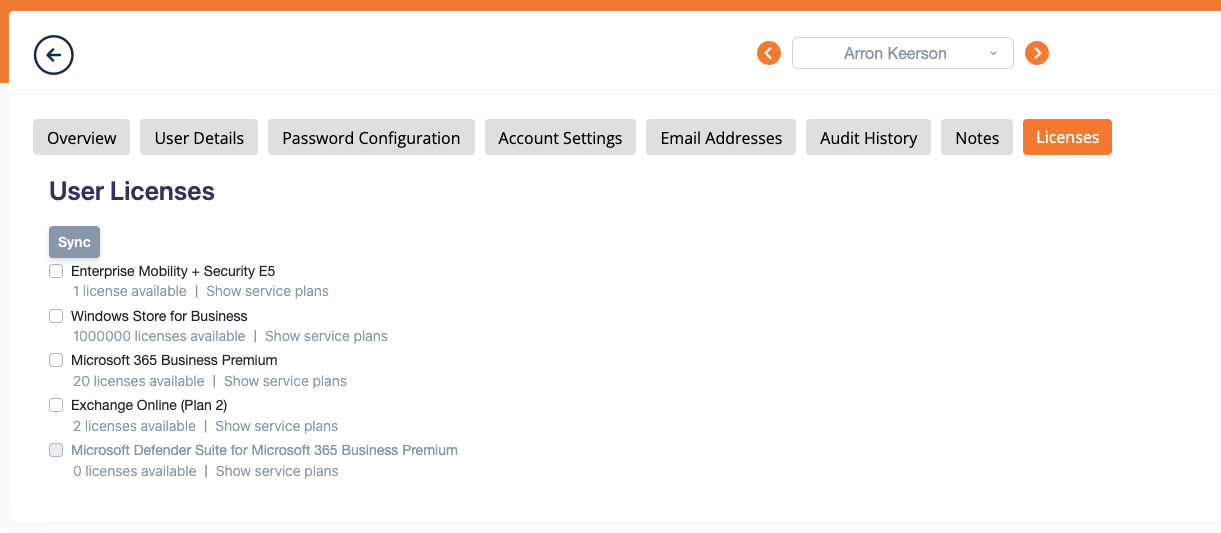
This dynamically loads licenses from Entra ID via Graph. This can be syncronised at any time.
This phased approach allows the new experience to be introduced safely, with no change for customers who have not yet enabled it.
Initial Phase
As part of the initial phase:
- The feature is available in the new UI only.
- Access is controlled through a feature toggle.
- It supports both Direct Connection and Partner Center connections to Microsoft Online.
- It is not shown in the old UI.